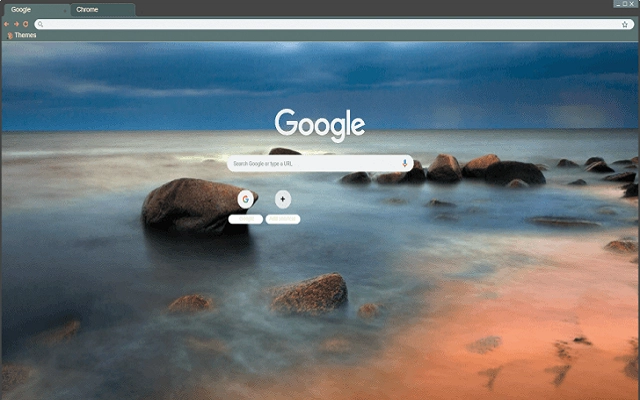

Sea Cloudy Sky Chrome Theme
Overview
The Sea Cloudy Sky Chrome Theme is a desktop utility designed to enhance the visual experience of the Google Chrome browser. By replacing the default background with a calming sea and cloudy sky image, it offers users a more personalized and visually engaging browsing environment. This tool is ideal for individuals seeking to improve focus and reduce visual fatigue during extended browsing sessions, particularly in productivity-focused workflows.
Target users include casual internet users, remote workers, and digital creatives who value aesthetic customization. The theme is specifically tailored for Chrome users who prefer a serene, nature-inspired backdrop to their digital workspace. While the developer, Kenh Caibio, is noted for creating browser customization tools, no additional details about the company or its broader product line were provided.
Real-world usage scenarios include using the theme during work hours to create a more immersive and pleasant browsing atmosphere, or as a mental reset during breaks. It can also serve as a subtle mood enhancer in environments where visual monotony is common. The theme operates entirely within the Chrome browser, requiring no additional system resources beyond those used by the browser itself.
Key Features & Capabilities
- Custom Background Image – Replaces the Chrome browser’s default background with a high-quality image of a sea and cloudy sky scene, promoting visual relaxation and aesthetic appeal.
- Browser Integration – Seamlessly integrates with Google Chrome, applying the theme directly through the browser’s extension system without requiring external software.
- Lightweight Design – At 1.2 MB, the theme is optimized for fast installation and minimal impact on browser performance.
- Platform Compatibility – Available for both Windows and Mac operating systems, ensuring broad accessibility across desktop environments.
- Free Access – The software is available at no cost, making it accessible to a wide audience without financial barriers.
Users can apply the theme in seconds through Chrome’s extension management page. Once installed, the background remains consistent across browsing sessions, offering a persistent visual upgrade. This feature is especially useful for individuals who use Chrome as their primary browser for work or personal use. The theme does not alter browser functionality—its sole purpose is visual customization, which makes it safe and non-intrusive.
User Interface, Workflow & Performance
The user interface of the Sea Cloudy Sky Chrome Theme is minimal and focused solely on visual presentation. There are no additional menus, settings panels, or configuration options beyond the standard Chrome extension interface. Users interact with the theme through the browser’s extension management page, where it can be enabled, disabled, or removed with a single click.
Workflow efficiency is high, as installation and activation require no technical expertise. The process involves downloading the extension file and adding it to Chrome, after which the background change takes effect immediately. No restart or additional setup steps are required.
Performance details were not specified by the developer. However, given the theme’s small file size and lack of background processes, it is expected to have negligible impact on system resources. The theme does not consume CPU or RAM beyond standard browser operations. Stability is assumed to be consistent with Chrome’s extension framework, though no official reports on crashes or conflicts were provided.
Compatibility & System Requirements
The Sea Cloudy Sky Chrome Theme is compatible with both Windows and Mac operating systems. It is designed to run within the Google Chrome browser, leveraging Chrome’s extension architecture for deployment.
The software has a file size of 1.2 MB, which indicates a lightweight footprint. Installation does not require additional software or drivers. The developer did not specify exact system requirements, including minimum RAM, CPU, or storage thresholds.
Platform compatibility information is limited to the operating systems listed. No details were provided about older versions of Chrome or potential conflicts with other extensions. Users are advised to ensure their Chrome browser is up to date to avoid compatibility issues.
Pros and Cons
Pros
- Free to download and use with no hidden costs
- Lightweight at just 1.2 MB, minimizing system impact
- Easy installation and activation through Chrome’s extension system
- Visually appealing design that enhances browsing experience
- Available for both Windows and Mac users
Cons
- No customization options for the background image
- Only available for Google Chrome, not other browsers
- No settings or configuration panel provided
- Developer information is limited to the name only
- Exact performance impact on older systems was not specified
FAQ Section
Is the Sea Cloudy Sky Chrome Theme free to use?
Yes, the software is available at no cost. There are no subscription fees or in-app purchases required.
Which operating systems does the theme support?
The theme is compatible with both Windows and Mac operating systems, provided they are running the Google Chrome browser.
Does the theme affect browser performance?
The developer did not specify resource usage details. However, due to its small size and lack of background processes, it is expected to have minimal impact on performance.
Can I update the theme automatically?
Updates are managed through the Chrome Web Store. If the theme is installed from there, it will update automatically when a new version is released.
Is the theme safe to install?
As a Chrome extension, it operates within the browser’s security sandbox. No additional permissions are required beyond standard extension access. However, users should only install extensions from trusted sources.
Final Thoughts
The Sea Cloudy Sky Chrome Theme delivers a simple yet effective way to personalize the browsing environment. Its serene visual design enhances user experience without compromising performance or security. While it lacks advanced customization, its straightforward functionality and free access make it a compelling choice for Chrome users seeking a peaceful, nature-inspired backdrop.
It is particularly beneficial for remote workers, students, and creatives who spend long hours online and value a calming digital workspace. The theme’s lightweight nature ensures it won’t slow down the browser, and its broad compatibility across Windows and Mac makes it accessible to most users.
For those looking to elevate their Chrome experience with a touch of tranquility, this theme offers a quick, safe, and free solution. Download Sea Cloudy Sky Chrome Theme now.







